Profile Overrides
The purpose of profile overrides is to support advanced configurations or troubleshooting based on manipulation of specific settings deployed to sensors that are not exposed in the configuration management UI.
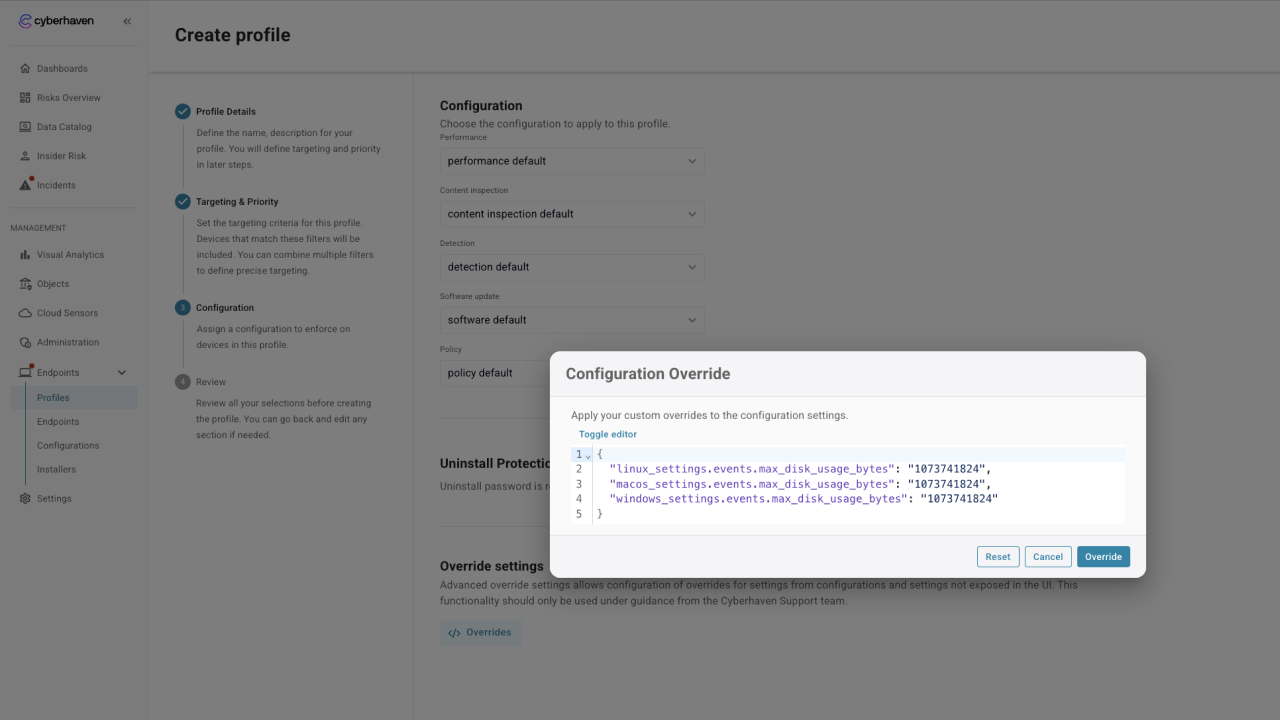
Override configurations should only be deployed with the assistance of the Cyberhaven support organization.
These configurations can have an impact on the performance of the sensors and collected telemetry, which may be unexpected.
Flattened JSON
Override configurations are displayed as flattened JSON strings with each level of the JSON hierarchy separated by a "dot" (period) an example would be
  "linux_settings.events.max_disk_usage_bytes": "1073741824",
  "macos_settings.events.max_disk_usage_bytes": "1073741824",
  "windows_settings.events.max_disk_usage_bytes": "1073741824",
This has been done to remove the requirement to understand the hierarchy of the full configuration or the ordering of values included.
If a single setting is required to be set for a specific configuration setting, then it can be added directly to the override settings with no consideration of the order in the overrides configuration.
Named Options
In this format, all of the options existing in the configuration can be represented. When the option in the config includes a name, then this also gets flattened into the object, for example,
"windows_settings.dlp.file_types.include.jpeg": true,
Configuration groups
Previously in the JSON configuration, groups of related settings would be included in indented sections of the configuration. Whereas, with the new layout, settings are all groups, each with the same root name. An example would be
  "windows_settings.blocking.fail_close.enabled": false,
  "windows_settings.blocking.fail_close.fail_close_timeout": "60s",
  "windows_settings.blocking.fail_close.popup_message": "File is being classified, please try again later",
  "windows_settings.blocking.fail_close.popup_title": "File temporarily blocked",
Here, all of the configurations relate to the fail close functionality.
List Configurations
If there is a list of values then these are then also flattened into a JSON list, an example would be
 "windows_settings.dlp.scan_locations.directories": [
    "%USERPROFILE%\\Documents\\",
    "%USERPROFILE%\\Desktop\\",
    "%USERPROFILE%\\Downloads\\",
    "%USERPROFILE%\\Pictures\\",
    "%USERPROFILE%\\Music\\",
    "%USERPROFILE%\\Videos\\",
    "%PUBLIC%\\Documents\\",
    "%PUBLIC%\\Desktop\\",
    "%PUBLIC%\\Downloads\\",
    "%PUBLIC%\\Music\\",
    "%PUBLIC%\\Pictures\\",
    "%PUBLIC%\\Videos\\",
    "%SystemRoot%\\Temp\\",
    "%USERPROFILE%\\Dropbox\\",
    "%USERPROFILE%\\Google Drive\\",
    "%USERPROFILE%\\My Drive\\",
    "%USERPROFILE%\\Google Drive (Shared Drives)\\",
    "%USERPROFILE%\\AppData\\Local\\Google\\DriveFS\\",
    "%USERPROFILE%\\OneDrive\\",
    "%USERPROFILE%\\OneDrive - COMPANYNAME\\",
    "%USERPROFILE%\\Box\\",
    "%USERPROFILE%\\iCloudDrive\\",
    "%USERPROFILE%\\MEGA\\",
    "/var/tmp/",
    "/var/log/",
    "/tmp/",
    "/Users/Shared/",
    "/Users/$USER/"
  ],
As with normal JSON processing
- Integers can be represented without quotes
- Booleans are represented as true or false
- Strings must be surrounded by double quotes
- Special characters require to be escaped with a backslash e.g. the backslash from Windows paths
 "windows_settings.protection.protected_processes_wildcards": [
    "*\\CYBERHAVEN\\*\\CYBERHAVEN*.EXE"
  ],
OS Specific Overrides
The configuration system in most cases does not differentiate between the operating systems supported when showing a configuration option, the platform will evaluate the setting and apply it to all cases. Should a modification of a provided setting be required for a specific operating system for troubleshooting then utilizing overrides is the recommended mechanism. As mentioned, this would be expected to be configured with the knowledge of the Cyberhaven CS team to ensure the implications are understood.
As an example of how this may be implemented, if the customer support team from Cyberhaven recommends expanding the offline storage settings specifically for macOS then the following setting could be added to overrides
"macos_settings.events.max_disk_usage_bytes": "1073741824",
The alternative would be that a new configuration can be created that is targeted specifically at macOS systems using the dynamic targeting and then this could change this value. In many instance this may be preferable as it brings clarity to the reason for the new configuration and profile and helps administrators understand the deployed configurations.