Data Type
Data Type labels use LLM-based classification to describe what a file or object is (for example, contracts, source code, billing records). In DSPM EA you start with more than two dozen Cyberhaven provided types and can tailor them to your environment in the Classification sidebar.

What you can do
- Create new Data Type labels with natural language descriptions.
- Extend Cyberhaven defaults by editing prompts or adding more examples.
- Add sub-labels for finer granularity inside an existing type (for example “Billing & Invoicing” → “Pool service quote”).
- Tune matching with either natural language or CEL expressions.
- Upload sample files to test whether a label matches as expected.
Create a new custom label
- Go to Classification > Labels > Data Type and select Add label.
- Enter a label name.
- Add inclusion rules. In each rule, describe your expectation in the AI prompt and optionally add a CEL expression for exact matching.
- Add exclusion rules for content that should not match.
- Use Upload file(s) or paste sample content to test before saving.
- Select Save configuration to publish the new label.

Add a sub-label
- In the Data Type page, click on a label to which you want to add a sub-label.
- In the left panel click on Add sub-label.
- Enter a sub-label name.
- Add the inclusion and exclusion rules to match the content.
- Use Upload file(s) or paste sample content to test before saving.
- Select Save configuration to publish the new label.
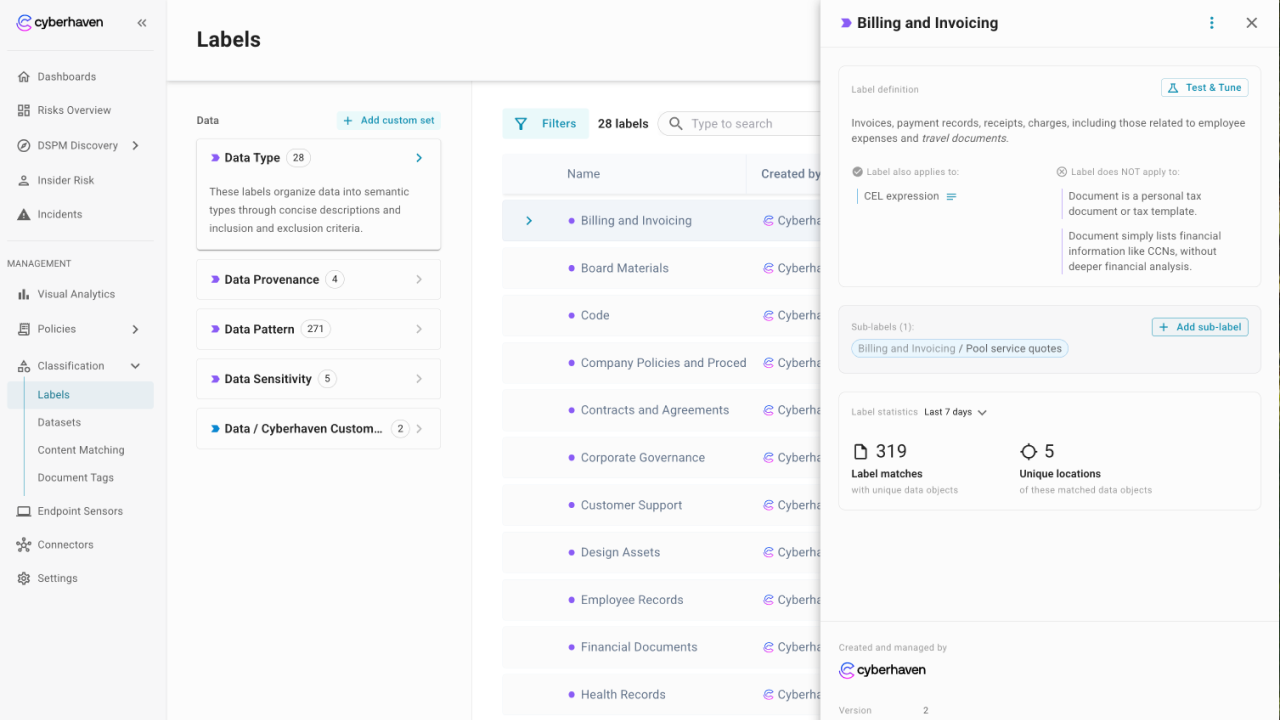
Tune and validate
- Use the Test and tune flow to upload representative files and confirm they match the intended label (or avoid false positives).
- When natural language is not specific enough, add a CEL expression to layer in rules such as restricting matches to a particular storage path or domain.
- Iterate on descriptions and CEL rules until the previewed matches align with your expectations.
Manage custom labels
- You can add entirely new top level Data Type labels to cover organization specific content while keeping Cyberhaven defaults intact.
- New and modified labels become available for downstream use in Data Sensitivity and custom label sets immediately after you save changes.