Data Catalog Search
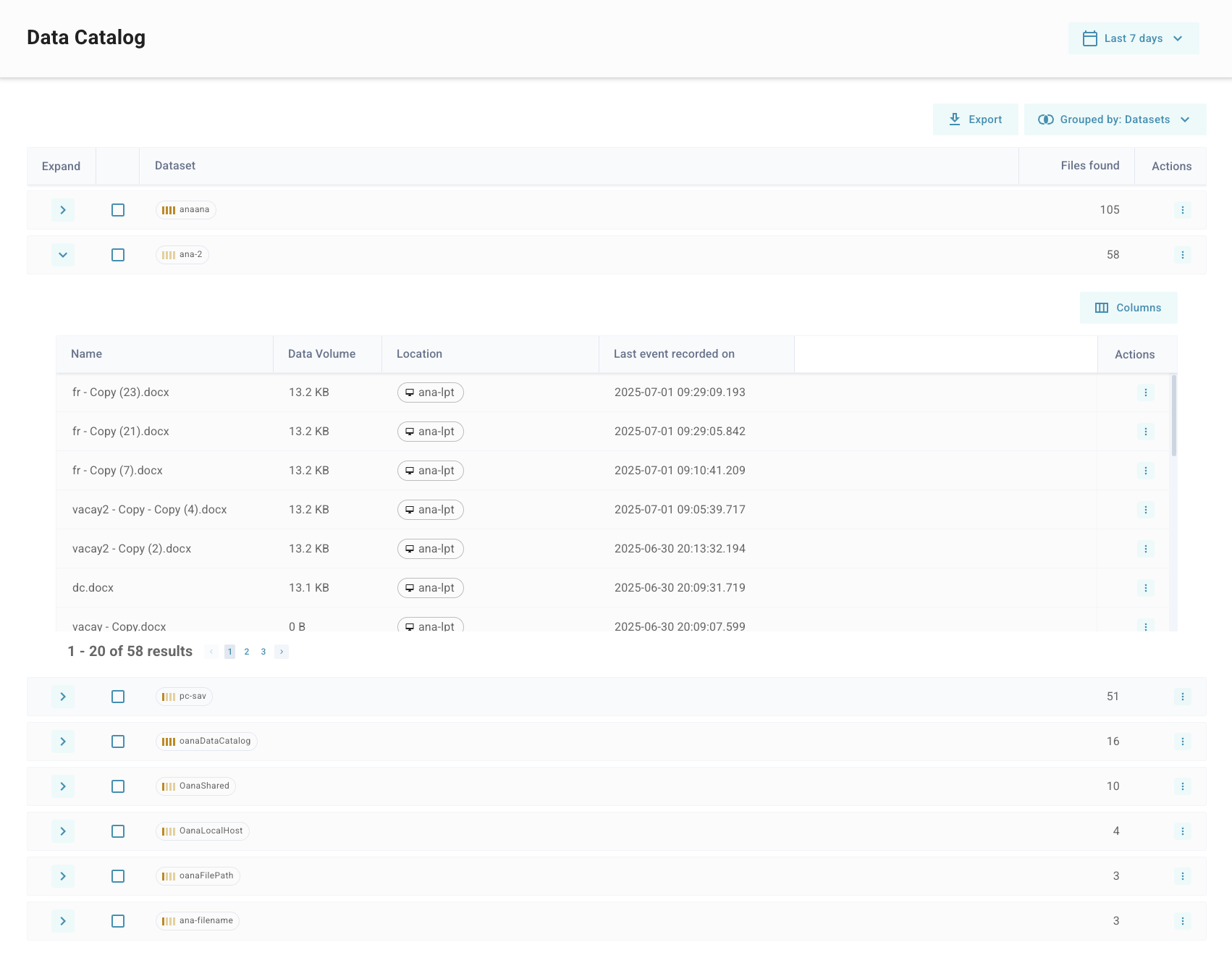
The Data Catalog page provides an interactive table view of all the data objects discovered in your environment. This feature is designed to help you quickly investigate the data collected by the Cyberhaven platform and narrow down results from the vast amount of data gathered. It offers an alternate view by abstracting data objects from the motion events typically used for risk and insider risk management.
Overview
The Data Catalog provides a detailed view into the data objects seen as part of the platforms ability to monitor Data-In-Motion and Data-At-Rest from the deployed endpoint sensors in the environment.
Warning At time of initial release there is no content inspection for Cloud sensor content cloud exclusive data objects are not visible in the data catalog. If the object has also been seen as a result of tracing by an endpoint sensor it will be able to be seen in the Data Catalog page.
- View grouped and classified datasets.
- Analyze how and where data has been used.
- Understand the origin and sensitivity of data.
- Jump to associated policy violations, user activity, and asset usage.
- Filter and sort based on metadata such as source, sensitivity, and copies.
Key Features
1. Grouped Views
The Data Catalog allows for grouping the reported objects by relevant characteristics as a default to provide an easier path to common workflows. Each group aggregates the view by those characteristics to reduce the total number of elements in the table and give a useful starting point to further investigation.
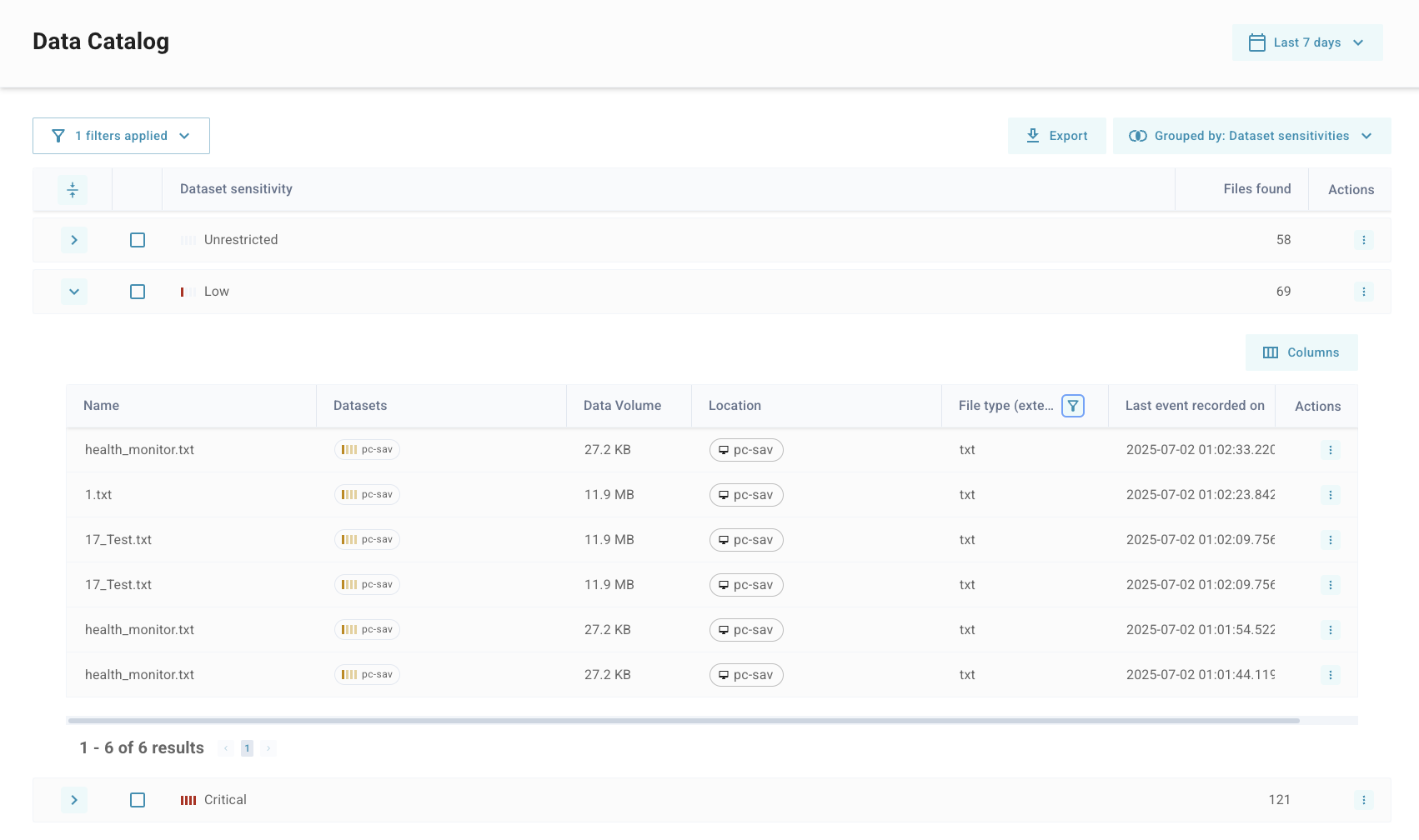
The image abbove shows the data catalog with a grouping applied for dataset sensitivity while also having a filter applied on file type which produces a much reduced list of objects which can be used to pinpoint relevant objects of interest for an investigation.
Each dataset row displays:
- Dataset Name (auto-assigned or user-defined)
- Sensitivity label (e.g., Confidential, Restricted)
- Copies count
- Sources of data (e.g., file path, application, device)
- First and Last Seen timestamps
- Actions: Drill down into events or link to policy or asset views
Screenshot placeholder: Grouped datasets with sensitivity labels and copy counts
2. Data Sorting and Filtering
To help users locate the most relevant data quickly, the table supports:
- Search by dataset name, file name, or origin.
- Sort by sensitivity, date seen, number of copies, or activity volume.
- Filter by:
- Sensitivity level (e.g., Confidential, Public)
- Source application or domain
- File type or extension
- Event type (e.g., download, upload, clipboard)
Screenshot placeholder: Filtering options dropdown and active filters applied
This enables analysts to pinpoint high-risk datasets or unusual behavior (e.g., many copies of a confidential file distributed across personal devices).
3. Integration with Platform Components
The Data Catalog serves as a central discovery point and integrates with several key Cyberhaven features:
- Event Timeline: Click any dataset to view its usage history, including who accessed it, when, and how.
- Policy Violations: Jump from a dataset to a list of events that triggered protection policies.
- User and Asset Views: Drill down into the user or device associated with a specific data event.
Screenshot placeholder: Example of clicking into a dataset to view event timeline and policy violations
These integrations make it easy to investigate incidents directly from the dataset level.
4. Data Provenance and Source Tracking
Every dataset in the catalog includes metadata on where the data originated. This includes:
- Source application (e.g., Google Drive, Slack, Chrome)
- File path or document URL
- Original user and device
This provenance data is collected from observed events (clipboard, download, save-as, etc.) and helps assess trustworthiness and ownership of content.
Screenshot placeholder: "Event recorded" field showing original source application and user
5. Copies and Distribution
A key feature of the Data Catalog is visibility into the spread of sensitive data. For each dataset:
- The number of copies across different devices, apps, or domains is displayed.
- Analysts can click into this to view the list of copies and the paths they took (e.g., download to desktop, email to external party, uploaded to Dropbox).
Screenshot placeholder: Copies modal showing locations and distribution timeline
This feature supports detailed forensics and helps organizations identify potential exfiltration or mismanagement of data.
Usage Recommendations
Use the Data Catalog to:
- Monitor the flow of your most critical data assets.
- Investigate incidents from a data-first perspective.
- Audit where sensitive data lives and how it moves.
- Detect shadow IT or unsanctioned tools handling sensitive information.