Content Inspection
Content inspection is how Cyberhaven looks inside files and data streams to understand what kind of information users are working with. It analyzes content as data moves and at rest, then feeds those results into classification, datasets, and policies.
What content inspection does
Cyberhaven’s content inspection engines:
- Extract text and metadata from supported files and data streams.
- Apply detection logic such as Content ID rules, Exact Data Matching (EDM), and OCR.
- Attach the resulting matches to events and dataflows for use in datasets, policies, incidents, and analytics.
Most processing runs in Cyberhaven’s cloud service. A limited local engine on the endpoint can recognize some tagged files without sending content to the cloud.
Content inspection is enabled by default on all tenants.
How content inspection works
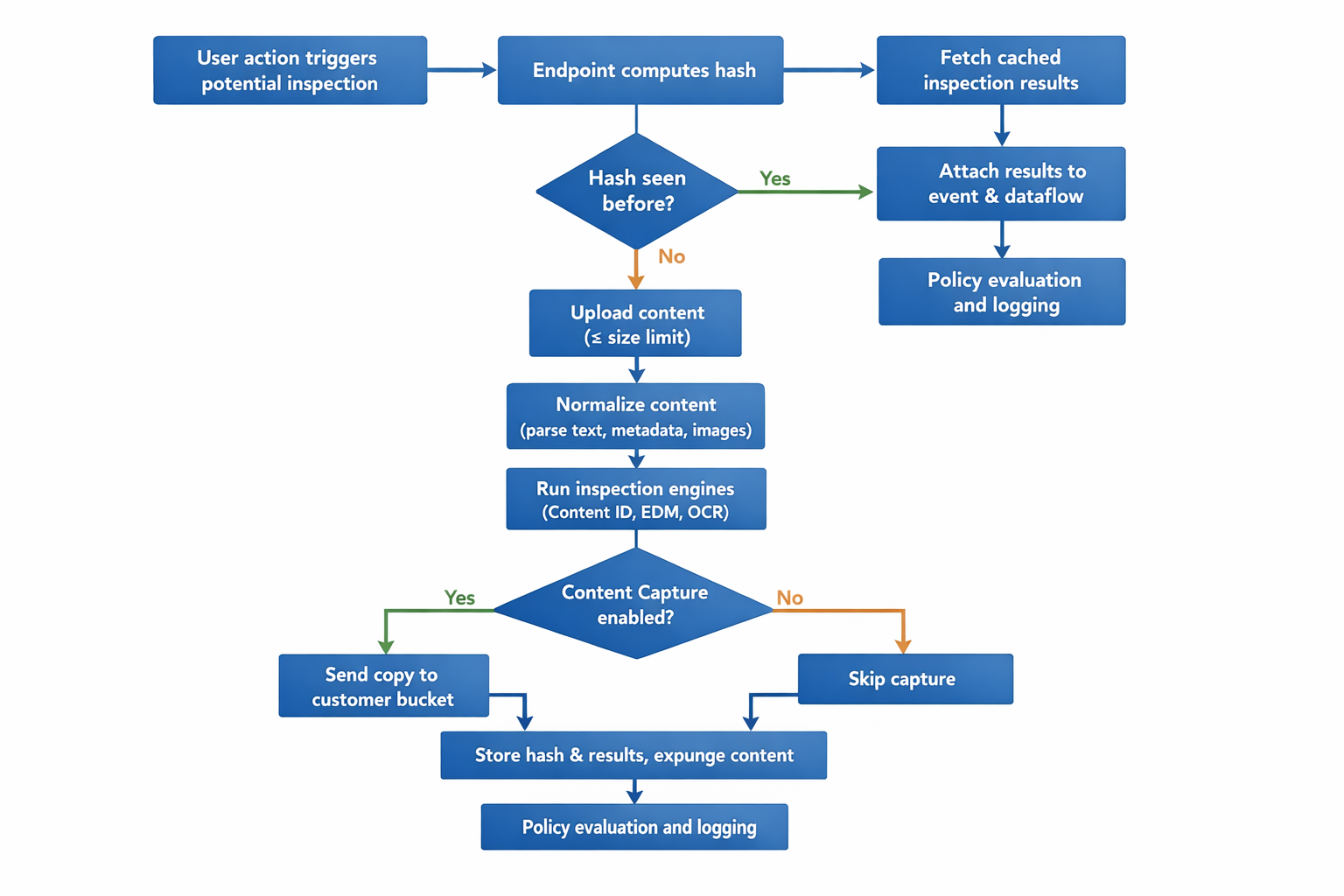
At a high level, Cyberhaven follows this flow when it inspects content:
:::procedure Content inspection flow
- The endpoint checks whether the file or object was already scanned by sending a cryptographic hash to the backend.
- If the content is new, the endpoint uploads it to the cloud service (up to a configurable size limit).
- The backend extracts and normalizes the content.
- The normalized content passes through the inspection engine, which applies pattern rules, EDM tables, and OCR where needed.
- The engine returns matches and attributes, which are attached to the relevant event and dataflow.
- If Content Capture is enabled, a copy of the content is sent to a customer‑controlled storage bucket.
- The backend stores only hashes and inspection results needed for policy decisions and investigations, then expunges the uploaded content. :::
Hash checking prevents repeated scanning of unchanged content and reduces latency for later events involving the same file.
By default, if inspection results are not yet available, policies evaluate with the information that is already present (this is a "fail open" behavior). In environments that require stricter control, Cyberhaven Support can enable Fail Close via remote configuration for selected deployment groups on supported Windows and macOS endpoints so that matching blocking policies temporarily block the user action until content inspection completes and a full policy decision is possible.
Content inspection across data states
Cyberhaven uses the same core engines across data in motion, data in use, and data at rest. The triggers and configuration differ by state.
Data in motion
Data in motion inspection runs in real time as users move data between applications, cloud services, and devices. Examples include uploads, downloads, email attachments, and transfers to removable media.
When one of these actions occurs, the endpoint:
- Checks whether the content has been scanned before.
- Uploads and inspects the content if needed.
- Applies policies that rely on classification, then enforces block, warn, or monitor as configured.
Data in use
Data in use inspection builds on the same pipeline but focuses on interactive actions while users work with data in applications and browsers. Examples include editing, viewing, printing, and copy‑paste operations.
The inspection engine uses the same rules and datasets. Results give additional context about what a user was doing with the data at the time of the action.
Data at rest
Data at rest inspection runs proactive background scans on endpoints and in connected cloud repositories. It classifies content before any user action occurs, so policies can apply immediately when data later moves.
On endpoints, the sensor:
- Gradually scans configured locations to limit resource use.
- Stores scan results locally and in the backend cache.
- Logs scan events in Risks Overview as Scan Activity under a system user such as ch-dar-scanner.
Cloud connectors use similar content inspection for DSPM scans of files stored in services like OneDrive, SharePoint, Google Drive, and Slack, based on each connector’s configuration.
Detection logic and building blocks
Content inspection relies on a few core building blocks:
- Content ID policies: Rules that detect patterns in text, such as PII, payment data, or custom regular expressions.
- Exact Data Matching (EDM): Rules that identify specific records (for example, customer IDs or account numbers) with high precision.
- OCR (Optical Character Recognition): Engines that extract text from images and scanned documents so the same rules can apply.
- Datasets: Objects that group the detection signals and other metadata (location, file type, labels) into named collections used by policies.
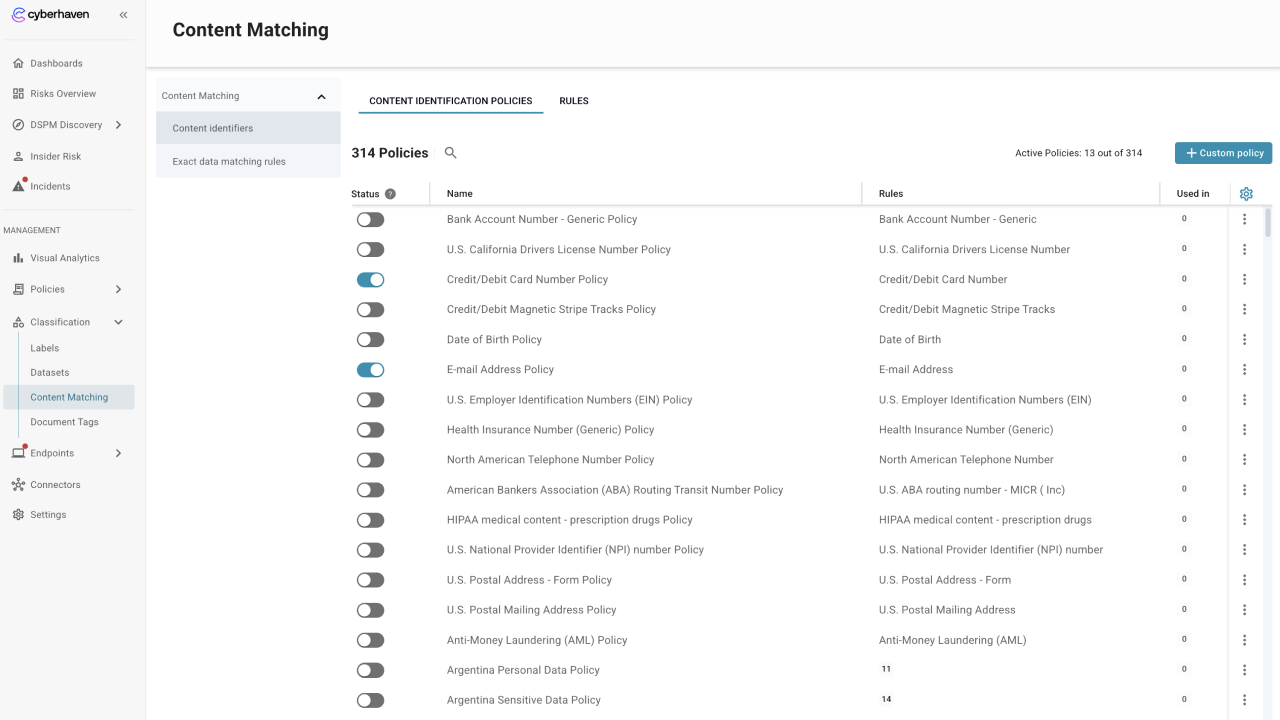
You manage Content ID rules, EDM tables, and Document Tags in the Content Matching area, then select them into datasets. Both Data Protection and Content Inspection policies reference those datasets.
Policies and configuration
Content inspection results are attached to events and dataflows and then used by datasets. Both Data Protection Policies and Content Inspection Policies select those datasets to decide which content to monitor, inspect, or capture.
Endpoint Sensors configuration
Use Endpoint Management to control where content inspection runs on endpoints.
-
For each deployment group, Content Inspection settings determine which Content Inspection Policies apply to data in motion.
-
Content Inspection Filters define the file types and locations that are in scope for data‑at‑rest scanning per group.
Most environments start with the defaults and adjust filters only for specific groups or performance needs.
Connectors and DSPM
For connectors, content inspection is configured in each connector’s settings. Typical options include:
- Whether to run historical and forward scans.
- File‑size and file‑type limits for inspection.
- Whether to send captured content to external storage.
These settings determine how DSPM uses content inspection to classify files at rest in cloud apps and are populated in the Discovery pages.
What to read next
- For the detection building blocks, see Content Matching (Content Identifiers, EDM, and Document Tags).
- For policy behavior, see Policy Management (Data Protection and Content Inspection policies).
- For endpoint configuration, see Endpoint Management (Content Inspection filters and deployment groups).
- For DSPM scanning behavior, see DSPM Discovery and Connectors for each supported SaaS or cloud service.