Content Inspection Prerequisites
This document outlines the deployment procedure for the Content Inspection on-premises stack. We currently support running Content Inspection containers in customer-controlled managed Kubernetes cloud environments:
- Google Cloud - GKE cluster
- Amazon AWS - EKS cluster
- Azure - AKS cluster
Please refer to the architecture guide for the overview.
Follow these steps section by section to deploy a new on-premises CI instance. While the actual deployment will be carried out by the customer, these steps document the procedure to enable the on-premises CI setup. Note that some steps may be automated or simplified in future iterations.
Preliminary Setup
The environment setup procedure varies by cloud provider. Please refer to the following documents:
The customer checklist and preliminary steps from the documents above should be DELIVERED TO THE CUSTOMER prior to deployment to ensure all steps can be completed.
SaaS Configuration
Follow the SaaS configuration steps to prepare the SaaS instance for connection to on-premises CI components. The SaaS procedure has some key differences across cloud providers:
- GCP Setup:
- Direct access granted to customer's GCP service accounts
- AWS & Azure:
- Customer workloads can securely authenticate and impersonate existing service accounts in customer's SaaS project (GCP)
- No additional permission changes required
- Federated Workload Identity enables workloads from trusted cloud providers to securely authenticate to the customer's GCP project
- Requires creating identity pool and provider in customer's GCP project
Enable on-premises CI connections to SaaS by activating the ci_stack.charts.dlp_proxy.mode TF flag.
Prerequisites Checklist
Before proceeding, verify that:
- Customer's managed Kubernetes cluster is ready
- Ingress controller is ready and tested with a hostname and a valid TLS certificate
- SaaS project is configured to enable access to customer's on-premises CI components
- On-premises CI connections are enabled (
hybrid-ingresschart deployed in SaaS environment)
Helm Chart Preparation
The CI stack deployment is packaged in the ci-stack-onprem Helm chart. Components are released via GitHub action. Release artifacts are available in the external artifacts repository.
Chart Access Configuration
Customers can access the repository either through:
- Direct rights
- Images pull secret
For direct GCP service account access, configure service account names in TF values (ci_stack.charts.<component>.onprem_customer_service_account).
For pull secret access:
- Create a new Service Account and key
- Grant artifact reader permission via Terraform
To create the the pull secret:
kubectl create secret docker-registry gcp-artifact-registry \
    --docker-server=us-docker.pkg.dev \
    --docker-username=_json_key \
    --docker-password="$(cat <ARTIFACT_READER_SERVICE_ACCOUNT_KEY>.json)" \
    --docker-email=support@cyberhaven.com \
    --dry-run=client -o yaml > gcp-artifact-registry-secret.yaml
The generated secret must be securely delivered to the customer and applied in the target cluster before deploying the Helm chart.
Chart Values Configuration
The ci-stack-onprem Helm chart includes default values override files for each cloud provider:
values-overrides-gcp.yamlvalues-overrides-aws.yamlvalues-overrides-azure.yaml
Modify only the corresponding values override file for the customer's environment, not the default values.yaml file.
Required Configuration Values
Pre-fill these customer-specific values:
installToken- sensor installation tokenSPANNER_URI- identical to customer's SaaS projectGCP_PROJECT- customer's SaaS GCP projectGCP_PREFIX- SaaS GCP prefixTOPIC_NAME-"<GCP_PREFIX>ci_stack.v1.ask"TOPIC_NAME_ANSWER-"<GCP_PREFIX>ci_stack.v1.answer"TOPIC_NAME_PRIORITY-"<GCP_PREFIX>ci_stack.v1.ask.priority"CI_SCANNER_SUBSCRIPTION-"<GCP_PREFIX>ci_stack.v1.ask-ci-scanner-sub"TIKA_SUBSCRIPTION-"<GCP_PREFIX>ci_stack.v1.ask-tika-sub"
Deployment Procedure
Customer Configuration
Update these values in the values-overrides-<PROVIDER>.yaml file:
- Content capture bucket configuration
- Cache bucket configuration
- Images tag (provided by Cyberhaven)
- Service account annotations
- Ingress configuration
Installation Steps
Set the target chart release version:
VERSION=<CHART-VERSION-PROVIDED-BY-CYBERHAVEN>
helm pull oci://us-docker.pkg.dev/cyberhaven-cd/external/charts/ci-stack-onprem --untar --version $VERSION
cd ci-stack-onprem
Make sure to copy over any additional configuration files provided by Cyberhaven to the chart’s folder (ci-stack-onprem), such as JSON credentials, values-overrides-<PROVIDER>.yaml file.
Validate the chart:
helm install ci-stack-onprem . -f values-overrides-<PROVIDER>.yaml --debug --dry-run=server
Install the chart:
helm install ci-stack-onprem . -f values-overrides-<PROVIDER>.yaml
Verify pod status (may take several minutes):
kubectl get pods -l app.kubernetes.io/instance=ci-stack-onprem
Deployment Validation
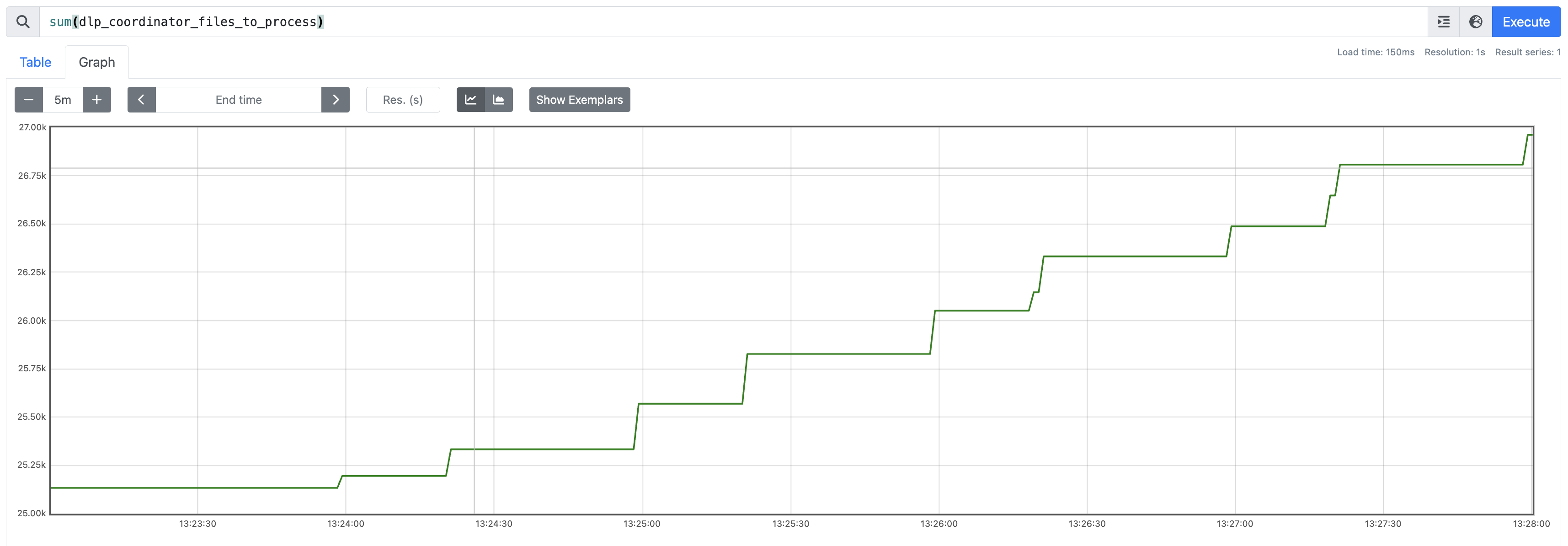
After installation completion and component startup, endpoints should begin sending requests to the Content Inspection stack. Monitor metrics from the dlp-coordinator via Prometheus in the cluster. Steady growth of the dlp_coordinator_files_to_process metric indicates successful request processing.
Upgrade
Upgrading content inspection chart
Download the Chart
`CHART_VERSION=”v24.09.28-d127c3d1”` # CHANGE to the target version
`helm pull oci://us-docker.pkg.dev/cyberhaven-cd/external/charts/ci-stack-onprem --untar --version $CHART_VERSION`
`cd ci-stack-onprem`
Review the Configuration File
Ensure that the customer configuration section up to the dashed line is filled with the environment configuration values provided by Cyberhaven. You can reuse your previous configuration file and update it with any new values provided.
Open the configuration file for editing:
${EDITOR} values-overrides-gcp.yaml
NOTE: If Cyberhaven provides a new image tag for the release, update the image tag in your values overrides file accordingly. The tags should be provided in the Changelog section below.
Check the Upgrade Diff
Preview the changes that will be applied during the upgrade:
helm template --api-versions 'networking.k8s.io/v1/Ingress' ci-stack-onprem . -f values-overrides-gcp.yaml -f previous-values.yaml | kubectl diff -f -
NOTE: When modifying existing values, ensure the changes are made in the rightmost file provided in the Helm command, as it takes precedence.
Upgrade the Release
Proceed with upgrading the release:
helm upgrade ci-stack-onprem . -f values-overrides-gcp.yaml -f previous-values.yaml
You should see an output similar to:
Release "ci-stack-onprem" has been upgraded. Happy Helming!

NAME: ci-stack-onprem

LAST DEPLOYED: Fri Oct  4 22:46:20 2024

NAMESPACE: default

STATUS: deployed

REVISION: 11

TEST SUITE: None
Verify Pod Status
Check if the pods are running and healthy:
kubectl get pods -l app.kubernetes.io/instance=ci-stack-onprem
Rollback if Necessary
If you encounter any issues, rollback the upgrade to the previous revision (use REVISION-1 from your upgrade command output). For example:
helm rollback ci-stack-onprem 10